Date 객체 인스턴스 만들기
예약어 new 사용
    const now = new Date();

    document.write(now);
+ 특정한 날짜를 지정한 Date 객체 ==> 괄호 안에 기입
    const now = new Date("1999-03-27T08:05:00");

    document.write(now);
Date 객체의 메소드
① getFullYear()
연도를 4자리 숫자로 표시
    const now = new Date().getFullYear();

    document.write(now);
② getMonth()
월을 0~11의 숫자로 표시
0 = 1월
11 = 12월
    const now = new Date().getMonth();

    document.write("현재는 " + (now + 1) + "월입니다");
③ getDate()
일을 1~31의 숫자로 표시
    const now = new Date().getDate();

    document.write("현재는 " + now + "일 입니다");
④ getTime()
1970년 1월 1일 자정 이후의 시간을 밀리초로 표시
    const now = new Date().getTime();

    document.write("1970년 1월 1일 이후로 " + now + "밀리초가 지났습니다.");
⑤ getHours(), getMinutes(), getSeconds(), getMilliseconds()
시, 분, 초, 밀리초를 표시
    const hour = new Date().getHours();
    const minutes = new Date().getMinutes();
    const seconds = new Date().getSeconds();

    document.write("지금은 " + hour + "시 " + minutes +"분 " + seconds + "초 입니다");
생일까지 남은 날짜 계산해보기
    const now = new Date();
    const birthday = new Date("2023-07-27");

    const d_day = birthday.getTime() - now.getTime();
    //생일까지 남은 시간을 밀리초로 계산

    document.write("생일까지 " + Math.ceil(d_day/(1000*60*60*24)) + "일 남았습니다");
    // 밀리초를 일로 나타내기 위해 1000*60*60*24로 나누기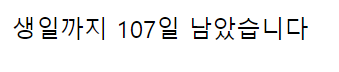
더보기
Do it! HTML+CSS+자바스크립트 웹 표준의 정석 교재를 참고하여 작성했다.
'JAVASCRIPT' 카테고리의 다른 글
| 브라우저 관련 객체 (0) | 2023.07.15 |
|---|---|
| 자바스크립트 내장 객체 - Math (0) | 2023.07.04 |
| 자바스크립트 내장 객체 - Array (0) | 2023.03.20 |
| 객체 (0) | 2023.03.14 |
| DOM을 이용한 이벤트 핸들러 (0) | 2023.03.14 |